
Shopware 6.7 cache tags: how to migrate your plugins to the new HTTP cache system
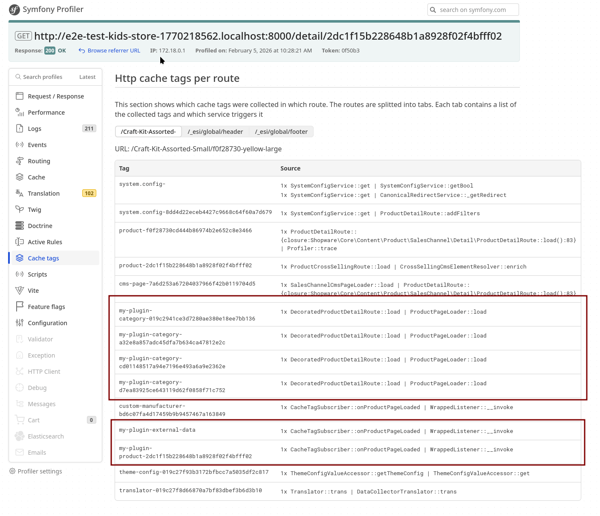
Shopware 6.7 ships with a reworked caching system. If you build plugins or extensions, this affects you. The old Cached*Route decorators and *CacheTagsEvent events are deprecated and will be removed in 6.8. But the new approach is simpler, more efficient, and actually easier to work with.
This post walks you through everything from the ground up: why the change happened, what the new architecture looks like, how to migrate your code, and what to watch out for. All code examples come from a reference plugin I created to demonstrate the new patterns.
What changed and whyLink to this section
Before 6.7, Shopware had two caching layers: a Store-API route cache (each route had a Cached*Route decorator with its own *CacheTagsEvent ) and the Symfony HTTP cache on top. This overlap caused duplicate invalidation logic and complex cache key calculation.
The biggest pain point was cache permutations. Shopware included all active Rule Builder rules in the cache key. With 50 rules, the system theoretically had to account for over a quadrillion possible combinations. In practice: low hit rates, wasted storage, and logged-in users bypassing the cache entirely.
The 6.7 rework addresses all of this:
- Single caching layer: caching now happens exclusively at the HTTP layer. The Store-API route cache decorators are gone.
- Smarter cache keys: only rules relevant to the current page affect the cache key (via “rule areas”), massively reducing permutations.
- Logged-in users cached by default: the HTTP cache is now opt-out instead of opt-in. Even users with filled carts get cached responses.
- Store-API caching: the Store API can now be cached too, including POST requests that get converted to GET.
- Configurable cache headers: fine-grained control over Cache-Control , s-maxage , etc. through YAML policies.
The mental model is simple: inject CacheTagCollector anywhere in your code and call addTag() . The HTTP cache layer picks up all collected tags and stores them with the response. To invalidate, call CacheInvalidator::invalidate() with those same tags. That’s it.
Migrating from the old to the new approachLink to this section
The old way was to subscribe to a cache-specific event like ProductDetailRouteCacheTagsEvent :
// OLD WAY - deprecated in 6.7, removed in 6.8
use Shopware\Core\Content\Product\Events\ProductDetailRouteCacheTagsEvent;

class OldCacheTagSubscriber implements EventSubscriberInterface
{
    public static function getSubscribedEvents(): array
    {
        return [
            ProductDetailRouteCacheTagsEvent::class => 'onProductDetailCacheTags',
        ];
    }

    public function onProductDetailCacheTags(ProductDetailRouteCacheTagsEvent $event): void
    {
        $event->addTags(['my-custom-tag']);
    }
}
Deprecated: All *CacheTagsEvent events ( ProductDetailRouteCacheTagsEvent , NavigationRouteCacheTagsEvent , CategoryRouteCacheTagsEvent , etc.) are deprecated in 6.7, no longer dispatched, and will be removed in 6.8.
The new way is to listen to a regular page-loaded event and inject CacheTagCollector :
// NEW WAY - 6.7+
use Shopware\Core\Framework\Adapter\Cache\CacheTagCollector;
use Shopware\Storefront\Page\Product\ProductPageLoadedEvent;

class CacheTagSubscriber implements EventSubscriberInterface
{
    public function __construct(
        private readonly CacheTagCollector $cacheTagCollector,
    ) {}

    public static function getSubscribedEvents(): array
    {
        return [
            ProductPageLoadedEvent::class => 'onProductPageLoaded',
            NavigationPageLoadedEvent::class => 'onNavigationPageLoaded',
        ];
    }

    public function onProductPageLoaded(ProductPageLoadedEvent $event): void
    {
        $product = $event->getPage()->getProduct();

        // Tag for external data invalidation
        $this->cacheTagCollector->addTag('my-plugin-external-data');

        // Tag for a specific product
        $this->cacheTagCollector->addTag('my-plugin-product-' . $product->getId());

        // Tag based on manufacturer
        $manufacturerId = $product->getManufacturerId();
        if ($manufacturerId !== null) {
            $this->cacheTagCollector->addTag('custom-manufacturer-' . $manufacturerId);
        }
    }

    public function onNavigationPageLoaded(NavigationPageLoadedEvent $event): void
    {
        $this->cacheTagCollector->addTag('my-plugin-navigation');

        $salesChannelId = $event->getSalesChannelContext()->getSalesChannelId();
        $this->cacheTagCollector->addTag('my-plugin-nav-' . $salesChannelId);
    }
}
The key difference: you are not responding to a cache-specific event anymore. You listen to a regular page-loaded event and tell the system “this page depends on these tags.” The caching layer handles the rest.
Register the subscriber in your services.xml :
<service id="Swag\CacheTagExample\Subscriber\CacheTagSubscriber">
    <argument type="service" id="Shopware\Core\Framework\Adapter\Cache\CacheTagCollector"/>
    <tag name="kernel.event_subscriber"/>
</service>
Alternative: adding tags via route decorationLink to this section
If you need data that is only available during route execution (e.g., the full product with associations), you can decorate the route instead:
class DecoratedProductDetailRoute extends AbstractProductDetailRoute
{
    public function __construct(
        private readonly AbstractProductDetailRoute $decorated,
        private readonly CacheTagCollector $cacheTagCollector,
    ) {}

    public function getDecorated(): AbstractProductDetailRoute
    {
        return $this->decorated;
    }

    public function load(
        string $productId, Request $request,
        SalesChannelContext $context, Criteria $criteria
    ): ProductDetailRouteResponse {
        $response = $this->decorated->load($productId, $request, $context, $criteria);
        $product = $response->getProduct();

        // Tag closeout products separately
        if ($product->getIsCloseout()) {
            $this->cacheTagCollector->addTag('my-plugin-closeout-products');
        }

        // Tag each category the product belongs to
        foreach ($product->getCategoryIds() as $categoryId) {
            $this->cacheTagCollector->addTag('my-plugin-category-' . $categoryId);
        }

        return $response;
    }
}
For most cases, prefer event subscribers since they are less invasive and easier to maintain. Route decoration is the right choice only when you need data exclusively available inside the route.
Invalidating cache by custom tagsLink to this section
Adding tags is only half the story. You also need to invalidate them when your data changes. Inject CacheInvalidator and call invalidate() with the same tags you added:
use Shopware\Core\Framework\Adapter\Cache\CacheInvalidator;

class CustomCacheInvalidator
{
    public function __construct(
        private readonly CacheInvalidator $cacheInvalidator,
    ) {}

    public function invalidateExternalData(): void
    {
        // All pages tagged with 'my-plugin-external-data' will be
        // re-rendered on the next request
        $this->cacheInvalidator->invalidate(['my-plugin-external-data']);
    }

    public function invalidateProducts(array $productIds): void
    {
        $tags = array_map(
            static fn (string $id) => 'my-plugin-product-' . $id,
            $productIds
        );
        $this->cacheInvalidator->invalidate($tags);
    }
}
Typical triggers for invalidation: webhooks from external APIs, admin event subscribers, scheduled tasks (cron), or the CLI command bin/console cache:invalidate my-plugin-external-data .
Custom rule areasLink to this section
This is the most advanced pattern. By default, the cache key only includes rules from predefined areas (products, shipping, payment). If your plugin defines custom rules via the Rule Builder that affect page content, you need to register your own rule area so the cache key includes them:
use Shopware\Core\Framework\Adapter\Cache\Http\Extension\ResolveCacheRelevantRuleIdsExtension;

class CacheRuleAreaSubscriber implements EventSubscriberInterface
{
    public static function getSubscribedEvents(): array
    {
        return [
            ResolveCacheRelevantRuleIdsExtension::NAME . '.pre' => 'onResolveRuleAreas',
        ];
    }

    public function onResolveRuleAreas(ResolveCacheRelevantRuleIdsExtension $extension): void
    {
        $extension->ruleAreas[] = 'myPluginCustomArea';
    }
}
Be careful: every rule area you add creates more cache variations. Only add areas that genuinely affect the rendered content. If your plugin does not use the Rule Builder, you do not need this.
Dynamic content: when not to extend the cacheLink to this section
Not everything should be cached. Some content is inherently dynamic: a greeting like “Hello, Max”, the cart item count, wishlists, loyalty points. With 6.7 caching logged-in users by default, this becomes critical.
The recommended pattern: cache the base page, load dynamic parts via JavaScript (AJAX).
In your Twig template, render a placeholder:
{# Cached with the page - just a container #}
<div id="my-plugin-dynamic-widget" data-url="{{ path('frontend.my-plugin.dynamic-widget') }}">
  <span class="skeleton-loader">Loading...</span>
</div>
Client-side JavaScript fetches the dynamic content after the cached page loads:
const widget = document.getElementById('my-plugin-dynamic-widget');
if (widget) {
  fetch(widget.dataset.url, {
    headers: { 'X-Requested-With': 'XMLHttpRequest' },
  })
    .then((response) => response.text())
    .then((html) => {
      widget.innerHTML = html;
    });
}
The AJAX controller on the server returns a non-cacheable response:
#[Route(
    path: '/my-plugin/dynamic-widget',
    name: 'frontend.my-plugin.dynamic-widget',
    methods: ['GET'],
    defaults: ['XmlHttpRequest' => true]
)]
public function dynamicWidget(Request $request, SalesChannelContext $context): Response
{
    $response = $this->renderStorefront(
        '@MyPlugin/storefront/component/dynamic-widget.html.twig',
        ['customer' => $context->getCustomer()]
    );
    $response->headers->set('Cache-Control', 'no-store, private');
    return $response;
}
When to use which approach:
| Scenario | Approach |
|---|---|
| Content depends on product/catalog data that changes occasionally | Cache tags + invalidation |
| Content depends on external API data with known update cycles | Cache tags + invalidation on webhook |
| Content is user-specific (name, cart, wishlist, loyalty points) | AJAX |
| Content changes every request (timestamps, live stock) | AJAX |
| Content varies by a small number of states (2-3 customer groups) | Cache tags |
| Content varies by a large number of states (per-user pricing) | AJAX |
If an entire page is too dynamic to cache, you can opt out by listening to the HttpCacheCookieEvent and calling disableCache() . But use this as a last resort. Every uncached page hits your application server directly, and under traffic spikes, that can bring your shop down.
Pitfalls to avoidLink to this section
Too many tags = low cache hit rate. If your plugin adds highly specific tags (one per user, one per session), you are effectively disabling the cache. A tag that varies across 10,000 customers creates 10,000 cache variations of the same page. Instead, group by customer group (typically 3-5 values) or use AJAX for truly individual content.
// BAD - creates a unique cache entry per user
$this->cacheTagCollector->addTag('my-plugin-user-' . $context->getCustomer()?->getId());

// GOOD - limited variations
$this->cacheTagCollector->addTag('my-plugin-group-' . $context->getCurrentCustomerGroup()->getId());
Rule of thumb: if a tag value can take more than ~10-20 unique values, use AJAX instead.
Forgetting to invalidate. Adding cache tags without ever calling invalidate() means stale content. If your plugin tags a page with my-plugin-pricing but never invalidates when prices change, users see outdated data until the cache expires naturally. Always pair addTag() with an invalidation strategy: webhooks, admin subscribers, cron, or CLI commands.
Over-invalidating. The opposite problem. Invalidating all product pages every 5 minutes “just to be safe” means the cache never warms up. Be specific. Invalidate only the tags that actually changed, not the nuclear product tag that wipes everything.
Not testing in production mode. The Symfony Profiler shows cache tags beautifully, but it is only available with APP_DEBUG=1 . In production, verify via response headers:
# Check cache tags
curl -I "https://your-shop.com/detail/product-id" | grep -i "x-shopware-cache"

# First request should be MISS, second should be HIT (fresh)
curl -I "https://your-shop.com/detail/product-id" | grep -i "x-symfony-cache"
Ignoring reverse proxies. If you use Varnish or Fastly, verify that tags are passed via the xkey header, that invalidation requests reach the proxy, and that the proxy is configured to purge by tag.
Debugging cache tagsLink to this section
The reference plugin includes a DebugCacheTagSubscriber that listens to AddCacheTagEvent and logs all tags being added. Check the logs with tail -f var/log/dev.log | grep “SwagCacheTagExample” .
Other methods: open Browser DevTools Network tab and check the x-shopware-cache-id response header, use the Symfony Profiler toolbar in dev mode, or run curl -I against your pages.
TimelineLink to this section
| Version | What’s available |
|---|---|
| 6.7.3.x / 6.7.4.x | Cache permutation optimization (feature flag CACHE_CONTEXT_HASH_RULES_OPTIMIZATION ) |
| 6.7.5.0+ | Full cache rework behind feature flag CACHE_REWORK |
| 6.7.6.0 | Cache rework targeted as complete (January 2026) |
| 6.8 | Feature flag removed, new behavior becomes default, old events removed |
You can start testing today by adding CACHE_REWORK=1 to your .env file on 6.7.5.0 or later. The new approach is backward compatible, so updated plugins work with both old and new caching behavior simultaneously.
ResourcesLink to this section
- Reference plugin (SwagCacheTagExample): clone it into your Shopware installation to see everything in action
- Shopware caching documentation
- The new caching system (Shopware blog) by Jonas Elfering and Andrii Havryliuk
- 6.7 upgrade guide